Cinegy Air 26.2 – What's New
Reading time ~5 minutes
Hello and welcome to the long-awaited release of Cinegy Air v26.2. We have been working hard behind the scenes to get a large number of updates, improvements, and general fixes out across all of the Cinegy product range, and now it is time for our best-selling Cinegy Air product to get its share of improvements and features. I hope you will enjoy and benefit from the additions contained within this release.
What’s New in Cinegy Air v26.2
Whilst the absolute detail will be available in the release notes document as usual, it may be beneficial to touch on some of the highlights from this release:
-
Achieved Nielsen watermark certification using the new SDK 6.1.1. Supported new Nielsen watermarks time parameters: the "Time Offset", "Destination DST State", and "Broadcast Delay".
-
Cinegy Playout engine now understands the SCTE35/104 “time signal” in addition to the old “splice insert” message to switch between commercial and live blocks. We now also have SCTE35/104 passthrough mode. In that mode, the Cinegy Playout engine processes SCTE35/104 “time signal” and “splice insert” messages from both video input and video files, including conversion for simulcasting. For RTP output, we still support only the “splice insert” message (as it was before). No conversion between “time signal” and “splice insert” has been implemented.
-
Added URL column for easy viewing of the Live URL without having to resort to the properties menu.
-
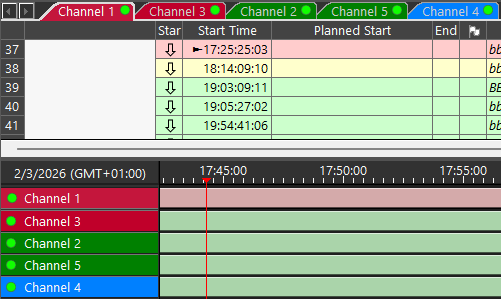
For customers with multiple channel tabs on a single Cinegy Air control surface, the ability to change the background colors to the channel names in the timeline view to enable them to be custom colored for identification has been added, whilst the ability to reorder the timeline and channel tabs will allow channels of the same color to be grouped together for ease of recognition.
-
We have listened to our customers and reinstated the ability to use the legacy APIs as well as the new and improved API option, thus not breaking customer in-house workflows.
-
Added further support for Blackwell GPUs, hardware-accelerated 4:2:2 10-bit encoding and decoding.
-
Added display of the "Avail Id" value for blocks in the playlist grid and on the timeline with a new popout window when required.
-
Communication between Cinegy Air/Studio control applications and the Cinegy Playout engine now uses gRPC instead of Microsoft RPC. This is to enable future non-Windows Cinegy Playout engine implementation. There should be no visible changes in behavior. However, please note that for the control connection, we now use port
5371+instance number(e.g., Instance 3 uses port 5374). -
Added support for interlaced H264 GPU encoding, for NVIDIA boards that natively don’t support it (Turing, Ampere, Ada families).
-
Introduced a new approach for the selection of the GPU device. Implemented "Auto" mode for automatically selecting the correct device for the defined encoder in RTP/UDP/SRT output.
-
Added support for AJA SDK v17.
-
Updated the "Edit Favorite Events" window for modifying the frequently used secondary events, which is combined with minor improvements in the GUI.
Cinegy Title Studio v26.2 BETA
We’re proud to introduce Cinegy Title Studio – a fast, effective, data-driven controller UI built for live operations. It’s designed to help operators move quickly, stay in control, and run complex graphics workflows with fewer mistakes and less manual effort.
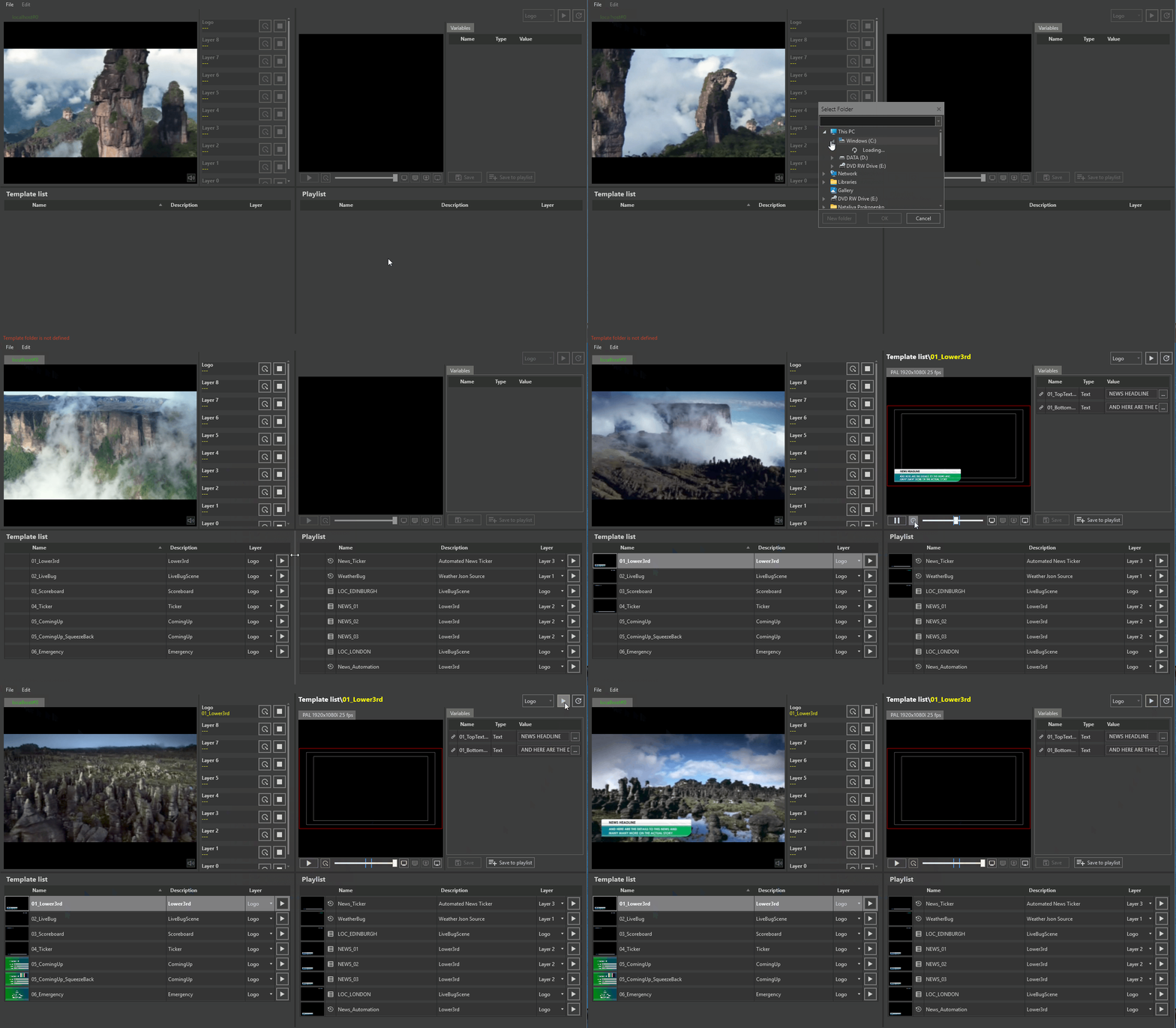
Major product capabilities:
-
A brand-new product: Cinegy Title Studio
-
A dedicated control UI for live graphics operations, built around speed, clarity, and repeatability.
-
-
Playlist-driven live workflow
-
Create multiple “references” to the same template, each with different variable values.
-
Keep them ready in the Playlist tab and take any item on air with a single click exactly when needed.
-
-
Preview panel for confidence before going on air
-
Preview animations, variable values, and the overall look/behavior of a CG item before sending it to playout.
-
Fix mistakes early, then push to playout when it’s correct.
-
Update variable values manually on the go through the Preview panel while working.
-
-
Truly data-driven automation
-
Feed templates using JSON, XML, CSV, or Microsoft Excel.
-
Step through each item/row in the data source automatically.
-
Refresh automatically when the file changes.
-
Run all day with zero operator intervention for suitable workflows.
-
-
Live-friendly UI flexibility
-
The UI can adapt to different operational styles and show setups.
-
Configure each show with its own layout/resizing behavior, so the interface matches the way that show is run.
-
A single machine can host many show folders, and you can switch between them seamlessly.
-
-
Full layer visibility and control
-
See and manage all layers clearly, giving operators confidence about what’s live, what’s queued, and what’s being prepared.
-
Warnings and Caution
Structured data formats are required: JSON, XML, CSV, and MS Excel sources must follow specific structures to be used for automation. Please refer to the Cinegy Title Studio manual for the exact supported formats and examples before building or adapting your files.
Deeper Dive
Cinegy Title Studio is built for the reality of live operations: rapid changes, last-second requests, and zero tolerance for mistakes. The playlist approach lets you prepare multiple variants of the same graphic ahead of time, then take the right one to air instantly, without rebuilding anything.
The Preview panel adds a safety layer that operators will appreciate immediately: you can verify animation and values before anything hits program output, correct issues early, and still retain the flexibility to adjust values while working.
And for workflows that demand scale, repeatability, and endurance, the data-driven engine turns templates into automated “machines”, feeding them row by row from structured files, automatically reloading on file changes, and keeping output updated without constant manual clicks.
This is the first release of Cinegy Title Studio, and it’s only the start – many more features and enhancements are already on the roadmap.
We hope you enjoy the new features and enhancements available in this latest release and that you continue to enjoy and benefit from the Cinegy broadcast software applications.
Simon Pilbeam and A. Burak Soyak, |