SMPTE ST 2110 Standard
Reading time ~5 minutes
Modern broadcasting has moved away from point-to-point coaxial systems like SDI (Serial Digital Interface), where a single cable carries a combined signal between exactly two endpoints, toward flexible, software-driven IP networks built on switched fabric. With SMPTE ST 2110, we finally get a standard designed from the ground up to break apart video, audio, and ancillary data, enabling truly flexible workflows.
Introduction
SMPTE ST 2110 is a suite of standards developed by the Society of Motion Picture and Television Engineers (SMPTE) for real-time transport of professional media over IP networks. Instead of bundling video, audio, and metadata into one signal, it sends each as a separate RTP stream.
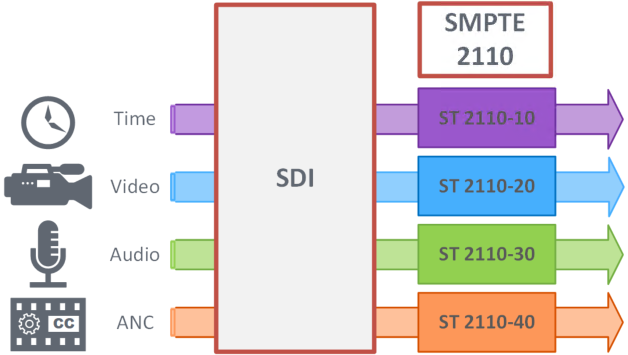
Architecture
Unlike SDI-based systems, SMPTE ST 2110 has strict network infrastructure requirements. It relies on a managed IP network with PTP-capable switches for synchronization, IGMP snooping enabled for efficient multicast stream delivery, and sufficient bandwidth to carry uncompressed media – which can reach tens of gigabits per second for high-resolution video.
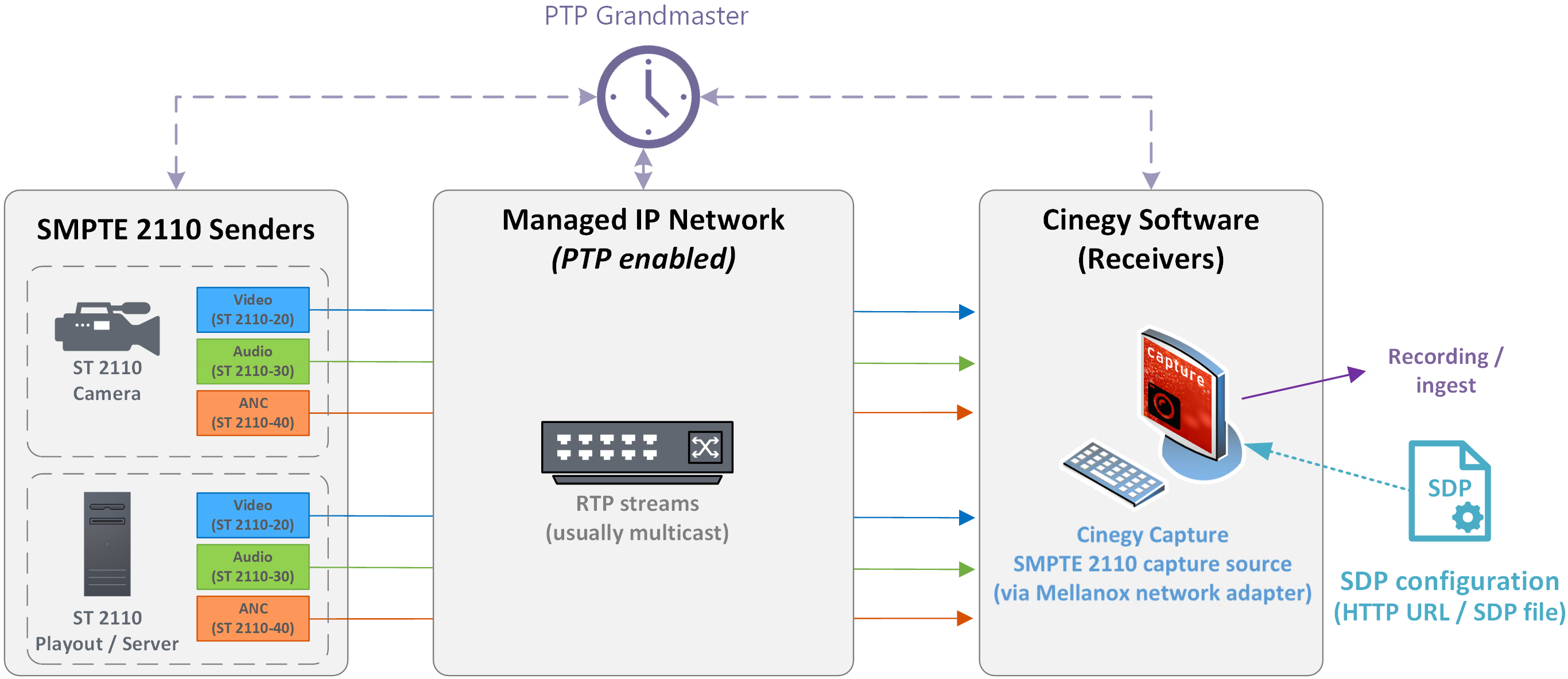
For each RTP stream, the ST 2110 Sender generates a text-based SDP file that describes the transmission information required by the ST 2110 Receiver, such as IP address and essence identity.
Video SDP defines the video essence parameters and network addressing. Audio SDP defines one or more audio streams. ANC SDP defines ancillary data such as timecode or captions.
SMPTE ST 2110 operation in Cinegy is supported by Cinegy Capture with Mellanox-based network adapters (as separate SMPTE 2110 sources).
Synchronization between streams is achieved using Precision Time Protocol (PTP).
This separation gives engineers more flexibility in routing, processing, and synchronization.
Mellanox Integration
High-performance ST 2110 processing in Cinegy workflows relies on Mellanox-based network adapters paired with the Media Transport Library (MTL) – an open-source library for high-throughput, low-latency media transport over IP.
These adapters enable:
-
high-throughput packet processing
-
reduced CPU load
-
stable reception of uncompressed streams
Installation and System Configuration
This section provides instructions for installing and configuring all components required for working with SMPTE ST 2110 in Cinegy software.
|
Caution
|
Administrator rights are required to install and configure the components. |
Installing Mellanox and Other Components
To work with SMPTE ST 2110 using Cinegy software, it is required to bring Mellanox-based network adapters into operation on Windows systems. Follow the steps below:
-
Download the Mellanox driver package from the Cinegy portal and unpack it.
-
Run the
MLNX_WinOF2-25_4_50020_All_x64.exefile and follow the instructions in the setup wizard to install Mellanox drivers. -
Run the
npcap-1.60.exefile and follow the instructions in the setup wizard to install Npcap. -
To deploy the Media Transport Library (MTL), copy the folder
MTL-24.9to%ProgramFiles%\Common Files\Cinegy\MTL-24.9.
Network Configuration
For reliable SMPTE ST 2110 operation, it is recommended to separate system communication (such as HTTP requests, preview streaming, and other network traffic) from SMPTE ST 2110 media transport by using several dedicated network adapters.
The network adapter assigned to SMPTE ST 2110 traffic should not be used for other network communication. To prevent the system from selecting this adapter for general network traffic, assign it a lower routing priority by increasing its interface metric.
To assign a static IP address and configure the interface metric for adapters used for ST 2110, open Network Connections in the Control Panel. Right-click the adapter, select "Properties" > "Internet Protocol Version 4 (TCP/IPv4)" > "Properties" > "Advanced", clear the "Automatic metric" check box, and set 100 in the "Interface metric" field.
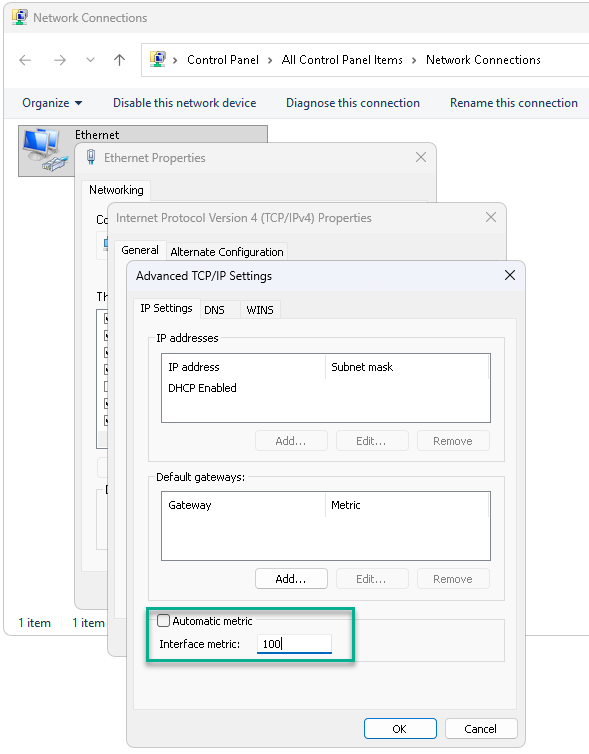
This configuration helps ensure correct routing when multiple network interfaces are present, particularly in configurations where SDP is retrieved via HTTP on the same video network.
Enabling DevX on Mellanox Adapters
DevX must be enabled on all Mellanox-based network adapters intended for SMPTE ST 2110 reception. The MTL used by Cinegy Capture relies on the DevX interface to access hardware resources required for high-performance packet processing. Without DevX enabled, MTL cannot initialize the adapter, and the device will not be available for SMPTE ST 2110 operation.
Run Command Prompt as Administrator and execute mlnx-devx.exe from the Mellanox package directory. The list of available Mellanox network adapters will be displayed as follows:
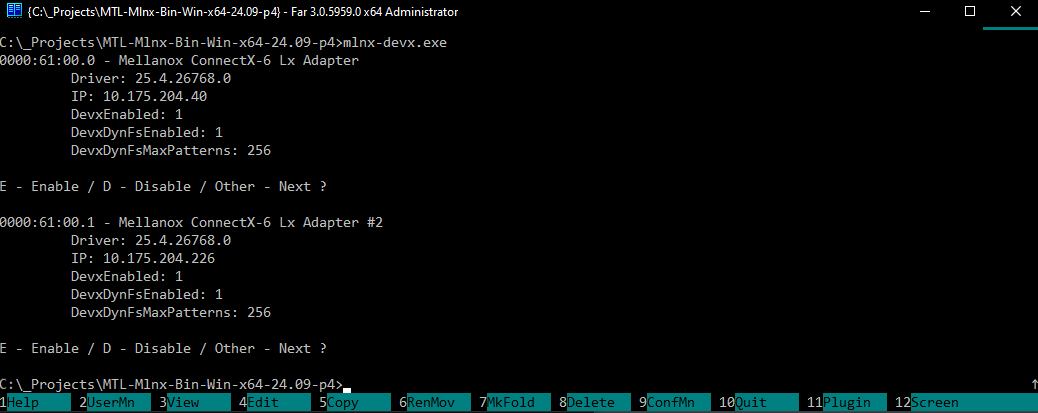
Press E to enable DevX for the selected adapter. This writes the configuration into the system registry.
When DevX is enabled on the network adapter, it is indicated as follows:
DevxEnabled: 1
DevxDynFsEnabled: 1
DevxDynFsMaxPatterns: 256
If all these parameters are set to 0, DevX is not enabled on the adapter.
The PCI address of each Mellanox-based network adapter can be copied from this prompt and used for source configuration in the form:
Domain:Bus:Device.Function (for example, 0000:61:00.0).
System Policy Configuration
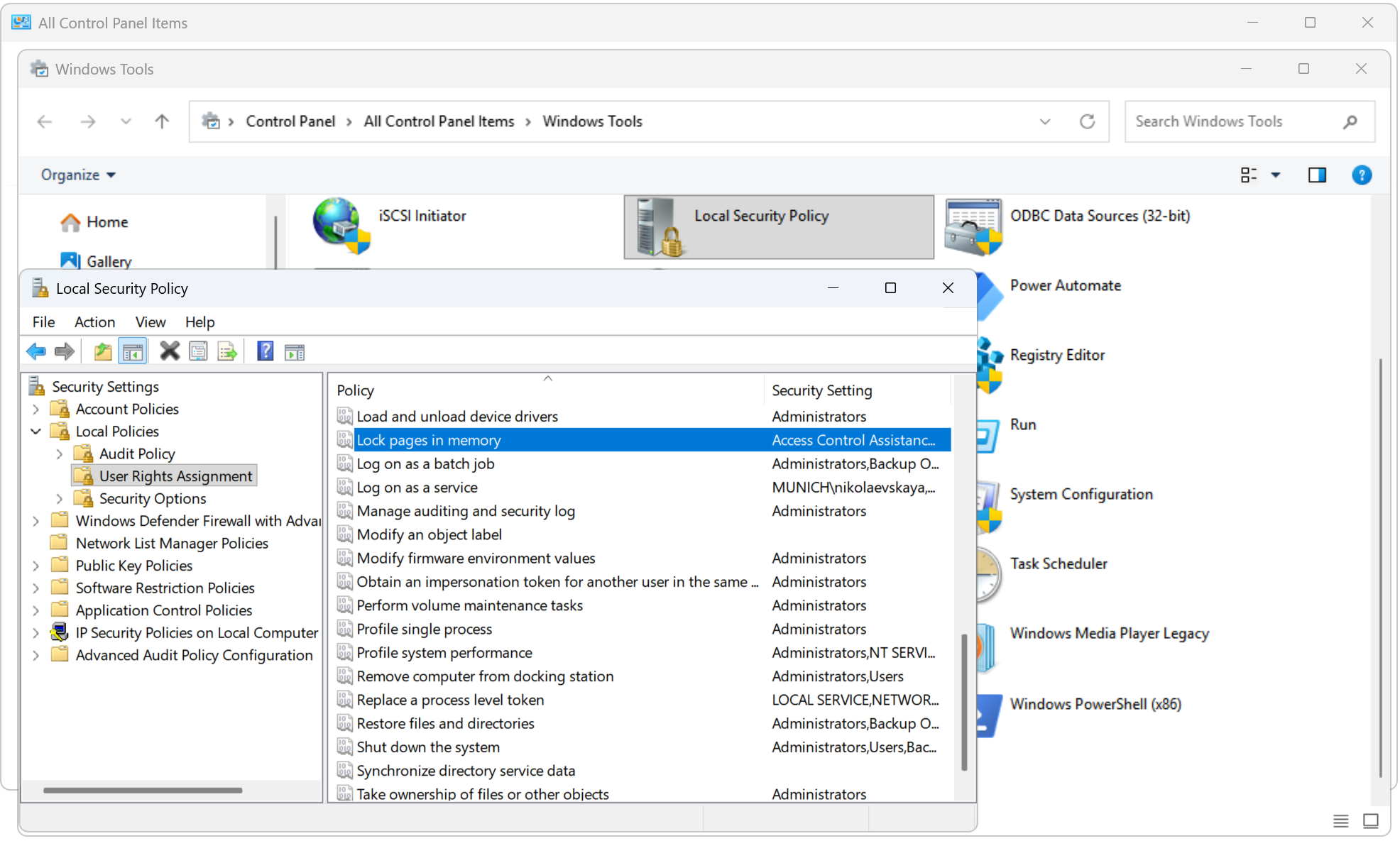
Navigate to "Control Panel" > "Windows Tools" > "Local Security Policy" > "Local Policies" > "User Rights Assignment", and for the "Lock pages in memory" policy, add the user who is supposed to run Cinegy services.
Configuration in Cinegy Applications
Next, configure SMPTE ST 2110 input in Cinegy Capture.
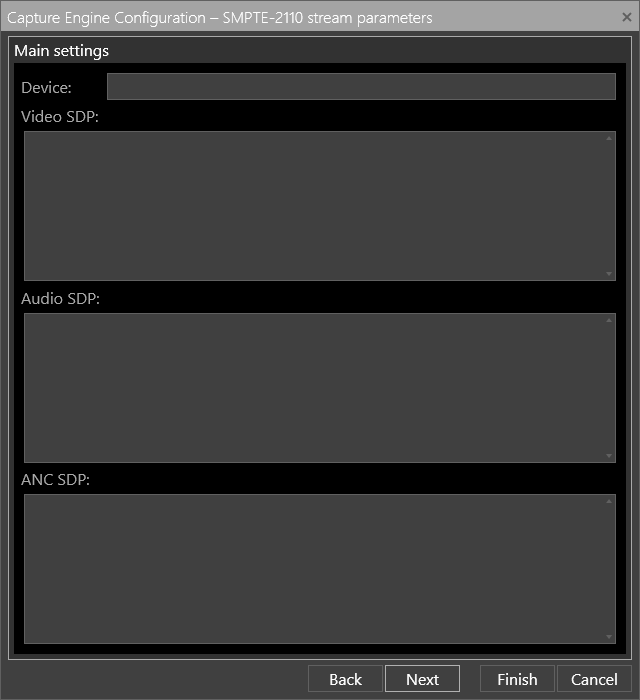
SMPTE-2110 Source in Cinegy Capture Manager
Here define the following parameters:
-
Device – the PCI device address of the Mellanox-based network adapter used for receiving SMPTE ST 2110 traffic in the form:
Domain:Bus:Device.Function(for example,0000:61:00.0).NoteFor reliable operation, the network adapter assigned to an SMPTE ST 2110 source must not be shared with other applications or services. Additional workloads, such as NMOS-related services, should use a separate network adapter. -
Video SDP – the video essence stream, including format and network parameters.
-
Audio SDP – the audio stream associated with the source.
-
ANC SDP – ancillary data streams, such as timecode or captions.
Obtaining SDP Configuration
The SDP configuration required for SMPTE 2110 source setup can be obtained from the SMPTE ST 2110 sender device, NMOS controller, or broadcast management system, depending on the deployment workflow.
The SDP can be provided to Cinegy Capture Manager in one of the following forms:
-
HTTP URL pointing to an SDP file (e.g.,
http://…/stream.sdp). -
SDP content as multiline text pasted directly into the configuration field.
The SDP content contains stream connection parameters, including multicast addresses, ports, media formats, and timing information required for receiving SMPTE ST 2110 streams.