Playout System
Reading time ~3 minutes
The Cinegy Air provides a convenient interface for the creation, editing, and broadcasting of channel playlists.
Cinegy Air consists of two software elements: Control and Playout. Both can exist on the same hardware or, be separated geographically on the same network. Cinegy Air control application is the operational GUI and connects to the playout software based engine Cinegy Playout which sends playlists to air.
|
Important
|
Refer to the Cinegy Playout Manual for a detailed description of configuring and operating of Cinegy Playout application. |
Playlist preparation is performed within the Cinegy Air Playlist Editor.
Cinegy Air control application is used for on-air playlist management and manual intervention.
|
Note
|
Refer to the Configuring Cinegy Air article for more details on the application setup. |
Any Server or PC connected to the network on which the Cinegy Air application has been installed can be used to prepare and edit playlists. A playlist can be composed of any clips of commonly supported file formats, as well as live events, either IP or SDI (with the addition of an appropriate SDI card) and/or with clips prepared in Cinegy Desktop. Using Cinegy Desktop is optional and is not required for Cinegy Air to operate.
|
Important
|
Refer to the Cinegy Desktop Manual for more details concerning this product. |
Once a playlist is ready for broadcast, it can be loaded into Cinegy Air and sent to the playout server.
Some of the key features offered by Cinegy Air include:
-
Instant playback of media material: any clip or Sequence prepared in Cinegy Desktop and added to a playlist can be sent on air immediately.
-
Instant playback of video files: a file in any Cinegy Air supported format (MPG, MOV, MXF H.264, H.265, etc.) added to a playlist can be broadcast immediately.
-
A playlist composed in Cinegy Air can be played back simultaneously on two Cinegy playout servers to meet redundancy requirements. Cinegy Air operates a 1+1 redundancy model, offering seamless switching between servers. In the case of any active changes in the playlist, the playout servers merge the altered playlist with the one being played, ensuring a smooth and swift change of the playout.
-
Reliable security system preventing unauthorized access to media material prepared for broadcasting.
-
Simultaneous broadcasting of different playlists in various TV formats to multiple channels as well as multiple output devices.
-
Simultaneous broadcasting of the same playlist to several channels (simulcasting) with different TV formats.
-
The playout software is implemented as an SQL-independent service to provide the most robust on-air playback.
-
Horizontal timeline view provides a clear overview for easy operations.
-
Secondary events support for external device control, Cinegy Title graphics templates, audio announcements, and more.
-
SCTE-35 or GPI events processing for automatic commercial insertion.
-
As-run log generation.
-
Uninterrupted broadcasting even in case of server disconnection from the local network or from Cinegy Archive (if there are proxied items in the playlist).
Proxy operation may be used if desired (but is not a requirement).
Items are proxied in chunks. Once proxied, the item is stored in a proxy folder (defined in the Cinegy Playout Configurator).
The entire proxy workflow is automatically managed from within the application, with storage allocation set in the Cinegy Playout configurator.
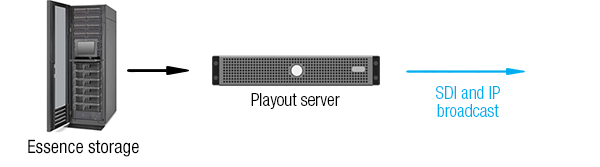
Items are proxied in the order they are played back. The playout server takes material for playback according to the playlist from essence storage as shown below:
In the case of repeat footage, it will not be re-proxied time but played back directly from the proxy folder.